
Minecraft attracts a vast community with more than 140 million people playing each month. With such a huge player base, it is natural to want a look that feels personal. Traditional skin design, however, often slows people down. It asks you to learn precision pixel work, manage tiny sprite maps, and spend long sessions perfecting details. For many players, that learning curve gets in the way of creativity. That is where an AI Minecraft skin generator steps in. It turns a photo or concept into a finished character style in moments, without any background in design.
Why the Classic Skin Workflow Holds People Back
Building a skin from scratch once demanded patience and niche skills. The usual method called for editing a 64×64 or similar sprite map, placing pixels with care, and previewing multiple times to see how it looked on a 3D model. A few specific roadblocks are common:
- Technical hurdles. Pixel editors are powerful, yet they expect accuracy that takes time to master.
- Heavy time cost. Even veteran creators can spend hours crafting a single character look.
- Mixed in-game results. A skin might appear polished in the editor, then feel off once animated or lit in the world.
- Recycled templates. Popular free bases get reused, so your character can blend into the crowd on busy servers.
- Edition differences. Java, Bedrock, and Pocket Edition can have format nuances that confuse newcomers.
For streamers, classroom projects, server communities, and brands, these obstacles can stall momentum. AI powered generation makes the process approachable by turning complex design work into a quick, guided flow.
Meet SuperMaker AI Minecraft Skin Generator
SuperMaker AI Minecraft Skin Generator focuses on solving every friction point listed above. Behind the scenes, advanced generative models interpret your references and translate them into clean, stylized pixel layouts that fit the Minecraft format. The goal is simple. You bring the idea, and the system handles visual translation, color harmony, and character mapping.
Turn Any Image Into a Skin
The headline capability is direct image to skin creation. Provide a clear picture of yourself, a concept sketch, a well known figure, or even an animal. The AI maps the key shapes, color palette, and identity, then renders a character that reflects your reference. You do not need knowledge of sprite maps or shading. The heavy lifting is automatic.
Customize Without Limits
After the first pass, you can keep refining. Adjust hues, tweak patterns, add visual accents, and view edits on a live preview. If you want an alternate take, generate again. There is no limit on re-renders, which invites experimentation. You can explore many styles, including fantasy, cyberpunk, historical, modern, or animal themed looks, then settle on the version that feels right.
Works Across Editions With Fast Export
Once you are happy, export a PNG that is ready for Java Edition, Bedrock Edition, and Pocket Edition. From generation to playing with your new appearance takes only a few minutes. Install through the usual account or launcher process and you are ready to go.
A Simple Walkthrough to Your First AI Skin
Step 1: Upload a Clear Reference
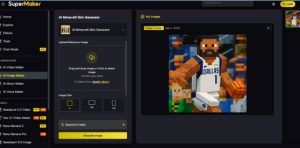
Pick a well lit image that represents your idea. A selfie works, as does a character drawing, a pet photo, or another visual that expresses your theme. Send it to the SuperMaker AI Minecraft Skin Generator as your starting point.
Step 2: Choose Output Size, Then Generate
Select an output size that matches the needs of the Minecraft edition you use. Start the generation and wait a moment as the tool interprets your reference and produces a skin. Preview the result on a rotating model so you can see front, back, sides, and overall fit.
Step 3: Refine Details, Download, and Apply
Prefer a brighter tone, a different accent, or a new accessory idea. Make edits and regenerate as needed. When satisfied, download the PNG. Apply it through your account settings or your launcher, then load the game and show it off on your favorite server.
What Makes SuperMaker Stand Out
There are many skin tools with different strengths. Some focus on editing. Others gather community uploads. SuperMaker AI is centered on unique generation from your own image and on giving you unlimited tries until you land on the perfect look. Here is a quick comparison in plain terms:
- SuperMaker AI. Converts references into original skins and supports infinite revisions. Great for anyone who wants a custom identity without learning pixel art.
- Skindex. Known for a wide library of community made skins. Best when you want to browse existing designs.
- MinecraftSkins.com. Good for straightforward edits with templates. Ideal for minor adjustments.
- Nova Skin. A manual pixel editor with depth. Suited to experienced artists who prefer hands on detail work.
- SkinMC. Helpful for viewing and inspecting skins. Useful when you want to preview appearances.
The difference is focus. Where most tools lean on templates or manual pixel placement, SuperMaker AI creates a one of a kind skin from your image right away, and you can iterate as much as you like.
Tips for Getting a Better Result
While you do not need any design background, a few habits can improve your first outcome:
- Choose a quality image. Clear edges and balanced light help the model understand your subject.
- Think in themes. Decide on a broad idea such as medieval adventurer, neon hacker, desert nomad, or forest ranger. This guides color and pattern choices.
- Refine in rounds. Use the unlimited generations to test small changes. Swap a color, add a trim, or try a different accent, then compare.
- Preview in context. Spin the model and imagine how it will look running, fighting, and building. Check that key elements read clearly from a distance.
- Keep contrast in mind. Distinct values help the face, arms, and armor lines stand out even in dark caves or bright biomes.
Who Benefits Most
This approach helps a wide range of players and creators:
- New playerswho want a unique presence without diving into pixel editors.
- Streamers and content creatorswho need a recognizable avatar that fits their brand identity.
- Teacherswho run classroom projects and want a quick way for students to personalize characters.
- Community leaderswho run servers and events and want cohesive themes for teams or factions.
Frequently Asked Questions
Do I need design experience to use it
No. SuperMaker AI automates the heavy design work. Upload a reference image and let the system interpret and render it into a finished skin.
Which Minecraft editions are supported
The exported PNG skins are compatible with Java Edition, Bedrock Edition, and Pocket Edition.
Can I upload a selfie
Yes. You can use a photo of yourself, an illustration, a pet, or a logo as your reference. The model will translate the visual identity into a Minecraft friendly design.
Are there limits on how many times I can try
You can regenerate as often as you wish. Make as many versions as you need until you are satisfied.
Is there a way to try it for free
Yes. SuperMaker offers a free trial so you can explore the generator before moving to a paid option.
From Idea to In-Game Identity
Your character skin is the face of your Minecraft identity. It is what others see when you join a server, record a video, or lead a team project. You could spend hours learning pixel art, or you could let a modern generator do the translation for you. SuperMaker AI makes the second choice possible by converting images into playable designs, letting you refine colors and accents, and exporting files that work across editions.
If making a custom skin has felt too complicated or time heavy, this new workflow removes the friction. Upload a reference, generate a draft, iterate without limits, then download and apply. In a matter of minutes you can step into the world with a style that feels personal and unmistakable.
Stop blending in and start showing off a look that matches your personality or your brand. With SuperMaker AI Minecraft Skin Generator, the path from idea to in game appearance is fast, friendly, and fun.